Step #3 — Competitive Analysis
Before defining the product direction, I reviewed seven gardening and plant-care apps. I compared their features, pricing, positioning, and user reviews to understand the current market and identify recurring usability issues.




What the Market Is Missing
Never paywall core features after launch — Gardenize's backlash proves it breaks trust fast.
Care Calendar should use weather/location logic, not fixed schedules.
No competitor combines journal + diagnosis + calendar — that's our gap to own.
Community/care-sharing adds value, but keep it optional, not the core hook.
Keep essentials (ID, basic care) free — directly solves the paywall frustration we found in research.
GreenThumbHub helps amateur gardeners plan, track, and care for their plants — with a personalized calendar, plant catalog, and a community space to share and learn.
GreenThumbHub helps amateur gardeners plan, track, and care for their plants — with a personalized calendar, plant catalog, and a community space to share and learn.

Challenge
Challenge
Amateur gardeners face the same recurring problem: caring for a garden requires constant attention, but knowledge about when and what to do for each plant is scattered — forums, YouTube, neighbors' advice, guesswork. There's no single place to keep the full picture of a garden: what's growing, when to water, when to feed, how each plant is developing over time.
Amateur gardeners face the same recurring problem: caring for a garden requires constant attention, but knowledge about when and what to do for each plant is scattered — forums, YouTube, neighbors' advice, guesswork. There's no single place to keep the full picture of a garden: what's growing, when to water, when to feed, how each plant is developing over time.
As a result, plants die from missed watering or delayed pruning, experience never accumulates because it's never recorded, and there's no easy way to document or share progress with others.
As a result, plants die from missed watering or delayed pruning, experience never accumulates because it's never recorded, and there's no easy way to document or share progress with others.
How might we help amateur gardeners easily organize plant care, track progress over time, and share their experience — without needing to be experts or keep manual records?
How might we help amateur gardeners easily organize plant care, track progress over time, and share their experience — without needing to be experts or keep manual records?

Reduce cognitive load — replace scattered mental notes and reminders with a system that automatically suggests what to do and when, based on season and plant type.
Reduce cognitive load — replace scattered mental notes and reminders with a system that automatically suggests what to do and when, based on season and plant type.

Make progress visible — turn daily care into a visible history: photos, observations, changes over time, so users can actually see the results of their effort.
Make progress visible — turn daily care into a visible history: photos, observations, changes over time, so users can actually see the results of their effort.

Lower the entry barrier for beginners — the plant catalog should explain basics in plain language, free of gardening jargon, so even a total novice can start with confidence.
Lower the entry barrier for beginners — the plant catalog should explain basics in plain language, free of gardening jargon, so even a total novice can start with confidence.

Create space for shared experience — let gardeners learn from each other, not just from abstract instructions.
Create space for shared experience — let gardeners learn from each other, not just from abstract instructions.
Problem Definition Process
Rather than guessing what gardeners need, I started by listening — to online communities, to real conversations, and to the small frustrations that don't always make it into a product brief.
Rather than guessing what gardeners need, I started by listening — to online communities, to real conversations, and to the small frustrations that don't always make it into a product brief.
Step #1 — Social media & community research
Observed gardening groups on Facebook and Reddit (r/gardening, local Polish/Ukrainian gardening communities) to see what amateur gardeners actually struggle with in their day-to-day posts and questions.
Recurring patterns across posts:
1. Diagnosis is the #1 recurring need.
2. Knowledge is scattered across too many sources.
3. Self-doubt is common among beginners.
4. Misinformation and conflicting advice circulate freely.
5. The community itself is the main support system — by default, not by choice.


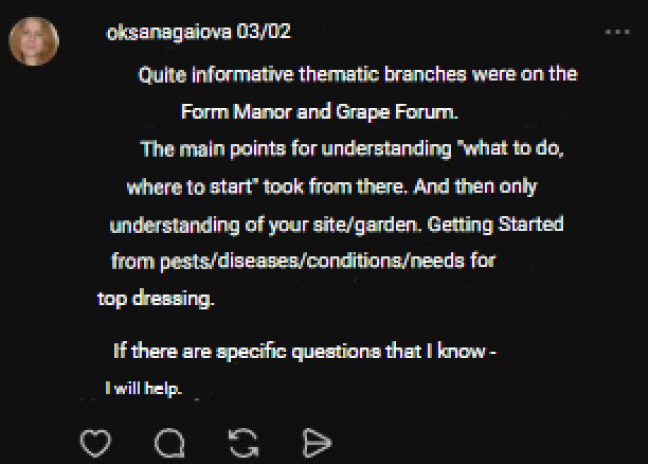

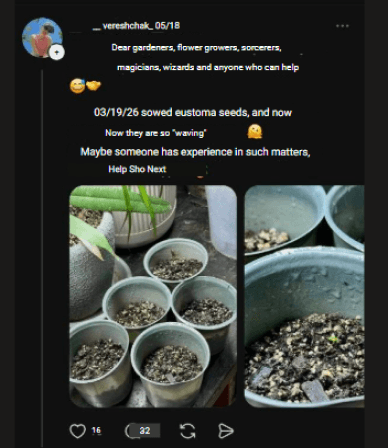


Many beginners don't just struggle with plant care—they struggle with confidence. Alongside technical questions, people often describe themselves as "bad gardeners" or feel discouraged after their first failed attempts. It became clear that they aren't only looking for answers about their plants—they're also looking for reassurance that they're doing things right.
Takeaway for the project:
Gardeners aren't failing due to lack of motivation — they're navigating a fragmented, inconsistent, and emotionally discouraging information landscape. This directly supports the core challenge: the need for one centralized, trustworthy space that combines care guidance, diagnosis, and community — instead of forcing users to patch it together themselves.
Step #1 — Social media & community research
Observed gardening groups on Facebook and Reddit (r/gardening, local Polish/Ukrainian gardening communities) to see what amateur gardeners actually struggle with in their day-to-day posts and questions.
Recurring patterns across posts:
1. Diagnosis is the #1 recurring need.
2. Knowledge is scattered across too many sources.
3. Self-doubt is common among beginners.
4. Misinformation and conflicting advice circulate freely.
5. The community itself is the main support system — by default, not by choice.
Many beginners don't just struggle with plant care—they struggle with confidence. Alongside technical questions, people often describe themselves as "bad gardeners" or feel discouraged after their first failed attempts. It became clear that they aren't only looking for answers about their plants—they're also looking for reassurance that they're doing things right.
Takeaway for the project:
Gardeners aren't failing due to lack of motivation — they're navigating a fragmented, inconsistent, and emotionally discouraging information landscape. This directly supports the core challenge: the need for one centralized, trustworthy space that combines care guidance, diagnosis, and community — instead of forcing users to patch it together themselves.
Step #2 — Conversations with amateur gardeners
Instead of guessing what people need, I asked two people close to me — different ages, different relationships with gardening — how they currently deal with plant care.
Participants: 2 informal conversations — my mother (long-time gardener, born 1971) and a friend interested in gardening but new to it.
What I learned

Real insight — my mother:
She used a plant-scanning app but deleted it once it required payment — even experienced gardeners want quick identification tools, but paywalls push them away.

Real insight — my friend:
She dreams of a beautiful garden but doesn't have time to search for advice — the barrier isn't motivation, it's time.
Takeaway for the project:
GreenThumbHub needs to remove friction — keep core features like plant ID and basic care free, and make trustworthy advice fast to find, so people don't have to search and scroll for it.
Step #3 — Competitive Analysis
Before defining the product direction, I reviewed seven gardening and plant-care apps. I compared their features, pricing, positioning, and user reviews to understand the current market and identify recurring usability issues.
What the Market Is Missing
Never paywall core features after launch — Gardenize's backlash proves it breaks trust fast.
Care Calendar should use weather/location logic, not fixed schedules.
No competitor combines journal + diagnosis + calendar — that's our gap to own.
Community/care-sharing adds value, but keep it optional, not the core hook.
Keep essentials (ID, basic care) free — directly solves the paywall frustration we found in research.
Step #4 — Meet Sofi
Based on the research — conversations with gardeners, community observations, and competitor analysis — I built a persona to ground every design decision in a real person's needs, not assumptions.

Sofia represents the core tension GreenThumbHub needs to solve: real enthusiasm for gardening, undermined by scattered tools and no time to spare. Every feature decision going forward is measured against one question — does this make her life easier, or just add another thing to manage?
Step #5 — Jobs to be Done
With Sofia's needs and frustrations mapped out, I translated them into concrete jobs — what she's trying to accomplish, why, and what "done" actually looks like for her.
Jobs to be done
Situation
Planning how to use her small garden space efficiently
Dealing with pests without wanting to use chemicals
Ending up with more harvest than she can use
Motivation
Grow a variety of plants in a limited space, without overcrowding it or losing the garden's look
Connect with other gardeners to share what I've grown instead of letting it go to waste
Protect my plants using safe, natural methods instead of toxic ones
Result
I get a visual planner that accounts for plant compatibility, spacing, and soil needs
I get access to natural pest-control methods, with photos to help identify the problem first
I can find nearby gardeners to exchange harvest with, and trust who I'm exchanging with
Sofia's jobs aren't really about "using an app" — they're about growing well, staying safe and eco-conscious, and not being alone in the process. That's the bar every feature needs to clear.
Step #6 — User Flow
Onboarding & Registration
Sofia can sign in or create an account using email or through Google, Facebook, or Apple ID. During sign-up, she also shares her gardening experience level and goals, so the app can tailor recommendations to her from the very first screen.

Season Planning
From the home screen, Sofia enters basic garden info — plot size, soil type, and any existing plants. The app generates a personalized planting calendar with recommended dates, which she can edit and download in her preferred format (PDF, JPG, or PNG).

Planting Journal
From "Planting journal," Sofia can take one of three actions: create a planting entry (with an optional care reminder), log a harvest report, or add a photo update to track growth over time. Every path leads to save and back to the home screen.

All three flows lead back to the Home screen — that's not by accident. It's a direct answer to the Step 2 insight: Sofia doesn't need another app demanding her attention, she needs a tool that works quietly and stays out of her way.
Step #7 — Customer Journey Map (CJM)
With the flows mapped out, the last piece is understanding how Sofia actually feels at each stage — where she's confident, where she hesitates, and where the product needs to step in and reassure her.

Sofia's journey shows the same pattern across every stage: she's genuinely motivated, but hesitant the moment something feels unfamiliar or too complex. The product's job isn't to teach her everything at once — it's to meet her where her confidence dips (planning, data entry) with simple defaults and gentle guidance, so enthusiasm doesn't stall out on the first unfamiliar screen.
Step #8 — Wireframes
With the flows and journey mapped out, I moved into low-fidelity wireframes — focusing on layout, hierarchy, and core interactions before any visual styling.
Authentication — sign in and a 3-step registration flow (credentials → profile details → confirmation)


Garden planning — building out the plot layout, adding plants, and saving the project (with a clear success state)


Personal dashboard — home screen and "My Plants," where each plant has its own detailed card


Step #1 — Social media & community research
Observed gardening groups on Facebook and Reddit (r/gardening, local Polish/Ukrainian gardening communities) to see what amateur gardeners actually struggle with in their day-to-day posts and questions.
Recurring patterns across posts:
1. Diagnosis is the #1 recurring need.
2. Knowledge is scattered across too many sources.
3. Self-doubt is common among beginners.
4. Misinformation and conflicting advice circulate freely.
5. The community itself is the main support system — by default, not by choice.
Many beginners don't just struggle with plant care—they struggle with confidence. Alongside technical questions, people often describe themselves as "bad gardeners" or feel discouraged after their first failed attempts. It became clear that they aren't only looking for answers about their plants—they're also looking for reassurance that they're doing things right.
Takeaway for the project:
Gardeners aren't failing due to lack of motivation — they're navigating a fragmented, inconsistent, and emotionally discouraging information landscape. This directly supports the core challenge: the need for one centralized, trustworthy space that combines care guidance, diagnosis, and community — instead of forcing users to patch it together themselves.
Step #2 — Conversations with amateur gardeners
Instead of guessing what people need, I asked two people close to me — different ages, different relationships with gardening — how they currently deal with plant care.
Participants: 2 informal conversations — my mother (long-time gardener, born 1971) and a friend interested in gardening but new to it.
What I learned
Real insight — my mother:
She used a plant-scanning app but deleted it once it required payment — even experienced gardeners want quick identification tools, but paywalls push them away.
Real insight — my friend:
She dreams of a beautiful garden but doesn't have time to search for advice — the barrier isn't motivation, it's time.
Takeaway for the project:
GreenThumbHub needs to remove friction — keep core features like plant ID and basic care free, and make trustworthy advice fast to find, so people don't have to search and scroll for it.
Step #3 — Competitive Analysis
Before defining the product direction, I reviewed seven gardening and plant-care apps. I compared their features, pricing, positioning, and user reviews to understand the current market and identify recurring usability issues.
What the Market Is Missing
Never paywall core features after launch — Gardenize's backlash proves it breaks trust fast.
Care Calendar should use weather/location logic, not fixed schedules.
No competitor combines journal + diagnosis + calendar — that's our gap to own.
Community/care-sharing adds value, but keep it optional, not the core hook.
Keep essentials (ID, basic care) free — directly solves the paywall frustration we found in research.
Step #4 — Meet Sofi
Based on the research — conversations with gardeners, community observations, and competitor analysis — I built a persona to ground every design decision in a real person's needs, not assumptions.
Sofia represents the core tension GreenThumbHub needs to solve: real enthusiasm for gardening, undermined by scattered tools and no time to spare. Every feature decision going forward is measured against one question — does this make her life easier, or just add another thing to manage?
Step #5 — Jobs to be Done
With Sofia's needs and frustrations mapped out, I translated them into concrete jobs — what she's trying to accomplish, why, and what "done" actually looks like for her.
Jobs to be done
Situation
Planning how to use her small garden space efficiently
Dealing with pests without wanting to use chemicals
Ending up with more harvest than she can use
Motivation
Grow a variety of plants in a limited space, without overcrowding it or losing the garden's look
Connect with other gardeners to share what I've grown instead of letting it go to waste
Protect my plants using safe, natural methods instead of toxic ones
Result
I get a visual planner that accounts for plant compatibility, spacing, and soil needs
I get access to natural pest-control methods, with photos to help identify the problem first
I can find nearby gardeners to exchange harvest with, and trust who I'm exchanging with
Sofia's jobs aren't really about "using an app" — they're about growing well, staying safe and eco-conscious, and not being alone in the process. That's the bar every feature needs to clear.
Step #6 — User Flow
Onboarding & Registration
Sofia can sign in or create an account using email or through Google, Facebook, or Apple ID. During sign-up, she also shares her gardening experience level and goals, so the app can tailor recommendations to her from the very first screen.
Season Planning
From the home screen, Sofia enters basic garden info — plot size, soil type, and any existing plants. The app generates a personalized planting calendar with recommended dates, which she can edit and download in her preferred format (PDF, JPG, or PNG).
Planting Journal
From "Planting journal," Sofia can take one of three actions: create a planting entry (with an optional care reminder), log a harvest report, or add a photo update to track growth over time. Every path leads to save and back to the home screen.
All three flows lead back to the Home screen — that's not by accident. It's a direct answer to the Step 2 insight: Sofia doesn't need another app demanding her attention, she needs a tool that works quietly and stays out of her way.
Step #6 — User Flow
Onboarding & Registration
Sofia can sign in or create an account using email or through Google, Facebook, or Apple ID. During sign-up, she also shares her gardening experience level and goals, so the app can tailor recommendations to her from the very first screen.
Season Planning
From the home screen, Sofia enters basic garden info — plot size, soil type, and any existing plants. The app generates a personalized planting calendar with recommended dates, which she can edit and download in her preferred format (PDF, JPG, or PNG).
Planting Journal
From "Planting journal," Sofia can take one of three actions: create a planting entry (with an optional care reminder), log a harvest report, or add a photo update to track growth over time. Every path leads to save and back to the home screen.
All three flows lead back to the Home screen — that's not by accident. It's a direct answer to the Step 2 insight: Sofia doesn't need another app demanding her attention, she needs a tool that works quietly and stays out of her way.
Step #7 — Customer Journey Map (CJM)
With the flows mapped out, the last piece is understanding how Sofia actually feels at each stage — where she's confident, where she hesitates, and where the product needs to step in and reassure her.
Sofia's journey shows the same pattern across every stage: she's genuinely motivated, but hesitant the moment something feels unfamiliar or too complex. The product's job isn't to teach her everything at once — it's to meet her where her confidence dips (planning, data entry) with simple defaults and gentle guidance, so enthusiasm doesn't stall out on the first unfamiliar screen.
Step #8 — Wireframes
With the flows and journey mapped out, I moved into low-fidelity wireframes — focusing on layout, hierarchy, and core interactions before any visual styling.
Authentication — sign in and a 3-step registration flow (credentials → profile details → confirmation)
Garden planning — building out the plot layout, adding plants, and saving the project (with a clear success state)
Personal dashboard — home screen and "My Plants," where each plant has its own detailed card
Step #2 — Conversations with amateur gardeners
Instead of guessing what people need, I asked two people close to me — different ages, different relationships with gardening — how they currently deal with plant care.
Participants: 2 informal conversations — my mother (long-time gardener, born 1971) and a friend interested in gardening but new to it.
What I learned
Real insight — my mother:
She used a plant-scanning app but deleted it once it required payment — even experienced gardeners want quick identification tools, but paywalls push them away.
Real insight — my friend:
She dreams of a beautiful garden but doesn't have time to search for advice — the barrier isn't motivation, it's time.
Takeaway for the project:
GreenThumbHub needs to remove friction — keep core features like plant ID and basic care free, and make trustworthy advice fast to find, so people don't have to search and scroll for it.
Step #8 — Wireframes
With the flows and journey mapped out, I moved into low-fidelity wireframes — focusing on layout, hierarchy, and core interactions before any visual styling.
Authentication — sign in and a 3-step registration flow (credentials → profile details → confirmation)
Garden planning — building out the plot layout, adding plants, and saving the project (with a clear success state)
Personal dashboard — home screen and "My Plants," where each plant has its own detailed card
Step #9 — Visual Concept
Visual design stayed intentionally simple — a consistent component system and green-and-yellow palette, with the focus on functionality over deep visual identity. The flow: garden dashboard → plant catalog → detailed care card.


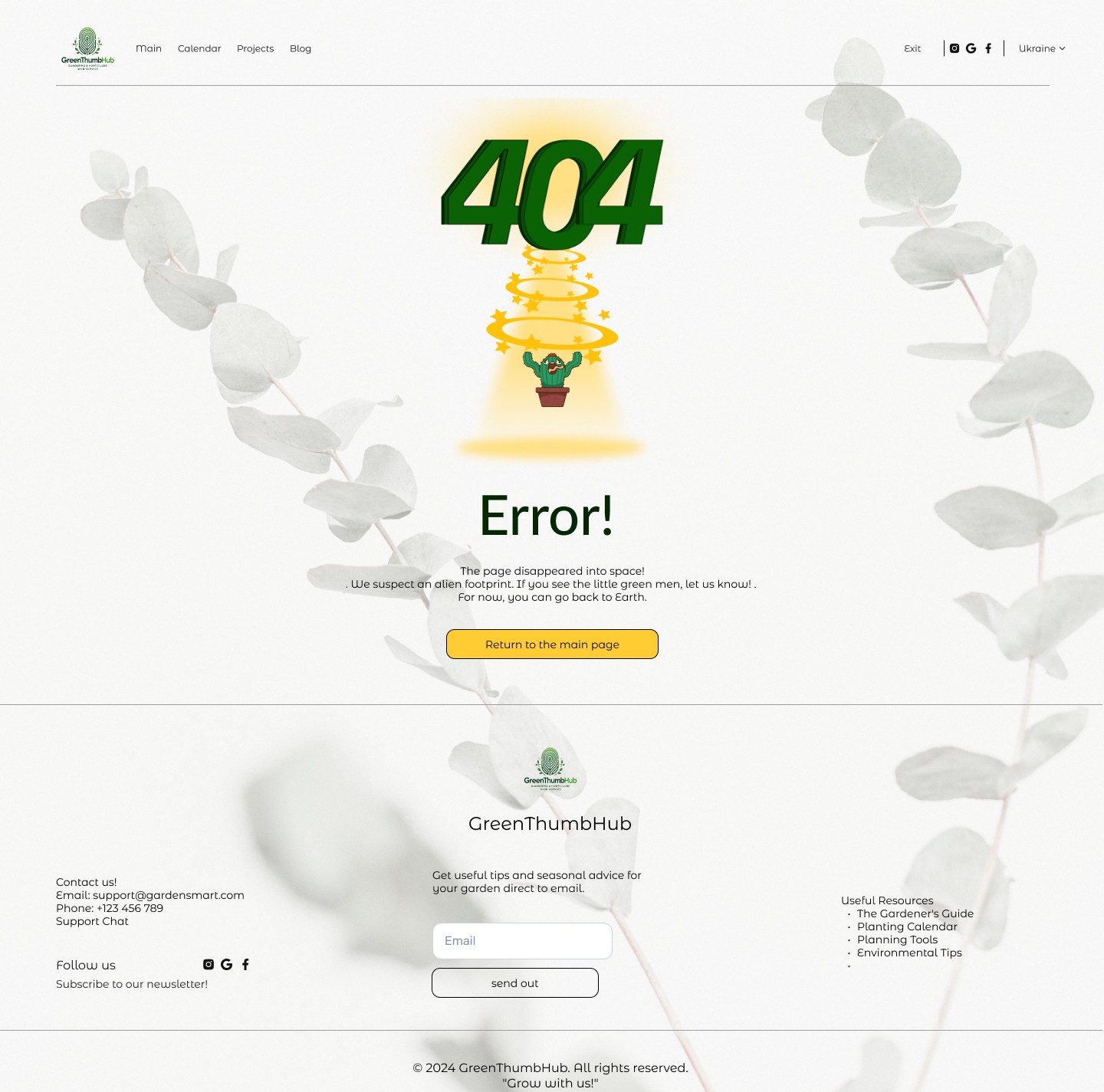
Mobile adaptation


Reflection — what I'd revisit
Reflection — what I'd revisit
Plot shapes: only square, circle, rectangle presets — no custom/freeform shape for irregular real-life plots
Plot shapes: only square, circle, rectangle presets — no custom/freeform shape for irregular real-life plots
Shape selection: all three shape buttons look identical, no clear active state
Shape selection: all three shape buttons look identical, no clear active state
Plant care pages: dense, repetitive lists (Care, Botanical description, Useful properties...) with no visual hierarchy — would break into tabs or collapsible sections
Plant care pages: dense, repetitive lists (Care, Botanical description, Useful properties...) with no visual hierarchy — would break into tabs or collapsible sections
Care-stat bars: same color regardless of value — a critical 35% and a healthy 69% look the same at a glance; would add color-coding tied to plant health
Care-stat bars: same color regardless of value — a critical 35% and a healthy 69% look the same at a glance; would add color-coding tied to plant health
Overall UI: would simplify further — fewer competing visual elements, more focus on the actions a gardener needs most often
Overall UI: would simplify further — fewer competing visual elements, more focus on the actions a gardener needs most often
Step #9 — Visual Concept
Visual design stayed intentionally simple — a consistent component system and green-and-yellow palette, with the focus on functionality over deep visual identity. The flow: garden dashboard → plant catalog → detailed care card.
Mobile adaptation
Step #4 — Meet Sofi
Based on the research — conversations with gardeners, community observations, and competitor analysis — I built a persona to ground every design decision in a real person's needs, not assumptions.
Sofia represents the core tension GreenThumbHub needs to solve: real enthusiasm for gardening, undermined by scattered tools and no time to spare. Every feature decision going forward is measured against one question — does this make her life easier, or just add another thing to manage?
Step #5 — Jobs to be Done
With Sofia's needs and frustrations mapped out, I translated them into concrete jobs — what she's trying to accomplish, why, and what "done" actually looks like for her.
Jobs to be done
Situation
Planning how to use her small garden space efficiently
Dealing with pests without wanting to use chemicals
Ending up with more harvest than she can use
Motivation
Grow a variety of plants in a limited space, without overcrowding it or losing the garden's look
Connect with other gardeners to share what I've grown instead of letting it go to waste
Protect my plants using safe, natural methods instead of toxic ones
Result
I get a visual planner that accounts for plant compatibility, spacing, and soil needs
I get access to natural pest-control methods, with photos to help identify the problem first
I can find nearby gardeners to exchange harvest with, and trust who I'm exchanging with
Sofia's jobs aren't really about "using an app" — they're about growing well, staying safe and eco-conscious, and not being alone in the process. That's the bar every feature needs to clear.
Step #6 — User Flow
Onboarding & Registration
Sofia can sign in or create an account using email or through Google, Facebook, or Apple ID. During sign-up, she also shares her gardening experience level and goals, so the app can tailor recommendations to her from the very first screen.
Season Planning
From the home screen, Sofia enters basic garden info — plot size, soil type, and any existing plants. The app generates a personalized planting calendar with recommended dates, which she can edit and download in her preferred format (PDF, JPG, or PNG).
Planting Journal
From "Planting journal," Sofia can take one of three actions: create a planting entry (with an optional care reminder), log a harvest report, or add a photo update to track growth over time. Every path leads to save and back to the home screen.
All three flows lead back to the Home screen — that's not by accident. It's a direct answer to the Step 2 insight: Sofia doesn't need another app demanding her attention, she needs a tool that works quietly and stays out of her way.
Step #7 — Customer Journey Map (CJM)
With the flows mapped out, the last piece is understanding how Sofia actually feels at each stage — where she's confident, where she hesitates, and where the product needs to step in and reassure her.
Sofia's journey shows the same pattern across every stage: she's genuinely motivated, but hesitant the moment something feels unfamiliar or too complex. The product's job isn't to teach her everything at once — it's to meet her where her confidence dips (planning, data entry) with simple defaults and gentle guidance, so enthusiasm doesn't stall out on the first unfamiliar screen.
Step #9 — Visual Concept
Visual design stayed intentionally simple — a consistent component system and green-and-yellow palette, with the focus on functionality over deep visual identity. The flow: garden dashboard → plant catalog → detailed care card.
More works

Ideas, internships, collaborations?
Let's talk!

More works
Kacperkowo
Website redesign for a private kindergarten
Web Design
Redesign
End-to-end design

Lumus
Gamified tutoring platform for kids aged 6–17
Mobile App
EdTech
End-to-end design
